Key takeaways
- Motor and stability: Dual motors and four-leg frames generally provide smoother lifting and better resistance to side-to-side movement, especially with heavy monitors or large desktops.
- Height range: Check the minimum and maximum heights against your seated posture, standing shoes, and monitor setup; a wide range is useful only if it suits your body and chair.
- Desktop size: Measure the room first, then allow space for a keyboard, mouse, monitor stands, speakers, and the rear cable drop without pushing the desk against a wall.
- Controls and presets: Memory buttons make frequent transitions effortless. Look for one-touch controls that are easy to reach and unlikely to be triggered accidentally.
- Build and maintenance: Inspect the frame, fasteners, cable routing, and included hardware. A clean assembly process and replaceable-looking components matter when you plan to keep the desk for years.
What's inside
A motorized standing desk can make a home office more comfortable, but choosing one is rarely as simple as picking the widest tabletop. Buyers have to weigh motor noise, frame stability, usable height range, cable management, control quality, and how much assembly their workspace can tolerate. A desk that looks impressive in a listing can still wobble, crowd a small room, or leave little space for a keyboard and accessories.
This guide takes a hands-on DIY maker approach: focus on the parts that affect daily use, long-term serviceability, and setup flexibility. It covers compact risers, complete desks, large dual-motor workstations, and a frame-only option for anyone who would rather build around a custom top.
As an Amazon Associate we earn from qualifying purchases.


How to Choose a Motorized Standing Desk (2026)
- Motor and stability: Dual motors and four-leg frames generally provide smoother lifting and better resistance to side-to-side movement, especially with heavy monitors or large desktops.
- Height range: Check the minimum and maximum heights against your seated posture, standing shoes, and monitor setup; a wide range is useful only if it suits your body and chair.
- Desktop size: Measure the room first, then allow space for a keyboard, mouse, monitor stands, speakers, and the rear cable drop without pushing the desk against a wall.
- Controls and presets: Memory buttons make frequent transitions effortless. Look for one-touch controls that are easy to reach and unlikely to be triggered accidentally.
- Build and maintenance: Inspect the frame, fasteners, cable routing, and included hardware. A clean assembly process and replaceable-looking components matter when you plan to keep the desk for years.
The Best Motorized Standing Desks (2026) Reviewed
FLEXISPOT 42-Inch Electric Motor Desk Converter
This compact FLEXISPOT riser is a practical solution for makers who already have a sturdy desk and want powered height adjustment without replacing it. Its motorized lift and quick-release keyboard tray suit a laptop or single-monitor station, while the smaller footprint works well in bedrooms, apartments, and multipurpose work areas.
FLEXISPOT Comhar 48-Inch Glass Standing Desk
The Comhar pairs a tempered glass top with built-in drawers and USB charging, giving a home office a deliberately finished look rather than a workshop feel. It is a good fit for organized setups with lighter everyday gear; just plan your cable routing carefully so the clean white surface remains the visual focus.
SANODESK Four-Leg 55-Inch Standing Desk
SANODESK’s four-leg design is aimed at users who want a broad, confidence-inspiring work surface for multiple monitors, tools, or a full computer workstation. The memory presets are useful for repeatable sit-to-stand changes, and the larger top gives you room to spread out without immediately reaching for a side table.
COLAMY 55-Inch Dual-Motor Standing Desk
The COLAMY combines a 55-by-28-inch desktop with dual motors, drawers, integrated outlets, and a footrest, making it one of the more feature-heavy complete desks here. It is especially appealing for a hybrid office-and-gaming setup, although its larger accessory package makes careful assembly and cable planning more important.
ErGear 48-Inch Electric Standing Desk
ErGear keeps the formula straightforward: a 48-by-24-inch top, smooth electric adjustment, four memory presets, and a steel frame rated for substantial equipment. Its moderate dimensions are easier to place in a typical home office, while the one-touch controller makes it a sensible value pick for a clean, no-fuss workstation.
Frequently Asked Questions
Are motorized standing desks worth it?
For many people, yes. Electric adjustment removes the friction that causes users to leave a desk at one height all day. The benefit is greatest when the desk has reliable presets and enough stability for your monitor arrangement.
Is a standing-desk converter better than a full desk?
A converter makes sense if your existing desk is sturdy, you need to preserve floor space, or you want a lower-cost upgrade. A full desk usually offers a cleaner height range, more usable surface area, and better support for heavier equipment.
How much weight should a motorized desk support?
Add the weight of the desktop, monitors, computer, speakers, accessories, and anything you regularly leave in place. Choose a capacity with headroom rather than operating close to the stated limit, particularly with tall monitor arms.
Can I use my own tabletop?
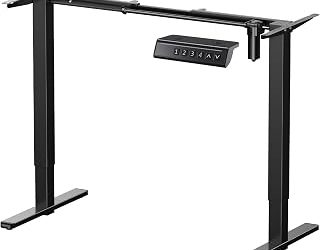
Yes, with a compatible frame such as the VIVO Premium Electric Four-Leg Dual-Motor Frame. Confirm the supported tabletop dimensions, thickness, mounting pattern, and total weight before drilling, and use a straightedge to keep the frame square during installation.
Final Thoughts
The ErGear is a well-balanced choice for a typical home office, while the SANODESK is the stronger option for a spacious, equipment-heavy setup. Choose the FLEXISPOT converter when keeping your existing desk matters most, or step up to the COLAMY for built-in storage and workstation extras.