Key takeaways
- Motor count and lift capacity: Dual-motor frames handle uneven loads far better than single-motor units, which is exactly what an L-shaped top with a cabinet on one leg creates. Look for 250 lb or higher rated capacity, and treat that number as a ceiling, not a target.
- Frame geometry: Dual-beam and one-piece welded frames resist the front-to-back sway that shows up above 40 inches of height. Check whether the crossbar spans the full width or just the leg columns, since a short crossbar gives up most of the torsional bracing.
- Desktop thickness and panel count: A 1.25 to 1.5 inch top with three-panel construction resists sag across long spans. Thinner tops on 70-inch surfaces will bow in the middle over a couple of years, especially under a monitor arm clamp.
- Cabinet integration: Pre-assembled cabinets with their own leveling feet carry weight instead of hanging off the desktop. If the file drawer bears on the top only, you’re loading the surface in shear every time you open it.
- Power routing: Built-in AC and USB ports save a mess of extension cords, but confirm the cable has enough slack to travel the full lift range. Measure the drop before you zip-tie anything, and leave a service loop.
What's inside
Executive standing desks sit in an awkward spot in the market. You want the footprint and presence of a real executive desk, but you also want the frame to lift 250 pounds of monitors, paperwork, and a file cabinet without shuddering at full extension. Most listings blur those two goals together, and the ones that fail usually fail in the same place: a single-motor lift under a slab that was never engineered for movement, or a cabinet bolted on as an afterthought that starts racking after a few hundred cycles.
I’ve spent enough time under desks with a socket wrench to know what separates a solid build from a wobbly one. This guide looks at six L-shaped and rectangular executive standing desks through a maker’s lens: how the frames are braced, whether the cabinet is structural or decorative, how much of the assembly is already done for you, and where the built-in power and cable routing actually helps versus where it just adds failure points.
As an Amazon Associate we earn from qualifying purchases.




How to Choose an Executive Standing Desk (2026)
- Motor count and lift capacity: Dual-motor frames handle uneven loads far better than single-motor units, which is exactly what an L-shaped top with a cabinet on one leg creates. Look for 250 lb or higher rated capacity, and treat that number as a ceiling, not a target.
- Frame geometry: Dual-beam and one-piece welded frames resist the front-to-back sway that shows up above 40 inches of height. Check whether the crossbar spans the full width or just the leg columns, since a short crossbar gives up most of the torsional bracing.
- Desktop thickness and panel count: A 1.25 to 1.5 inch top with three-panel construction resists sag across long spans. Thinner tops on 70-inch surfaces will bow in the middle over a couple of years, especially under a monitor arm clamp.
- Cabinet integration: Pre-assembled cabinets with their own leveling feet carry weight instead of hanging off the desktop. If the file drawer bears on the top only, you’re loading the surface in shear every time you open it.
- Power routing: Built-in AC and USB ports save a mess of extension cords, but confirm the cable has enough slack to travel the full lift range. Measure the drop before you zip-tie anything, and leave a service loop.
The Best Executive Standing Desk (2026)s Reviewed
70″ L-Shaped Executive Standing Desk with File Cabinet
This is the most complete package here for a corner setup, pairing a black walnut finish with an integrated file cabinet, AC/USB ports, and a modesty panel that actually hides the cable run. The 70-inch return gives you room for a laptop dock on one side and paperwork on the other without stacking.
66.93″ L-Shaped Desk with Lockable Cabinet
The standout feature is how little assembly is left to you: the three-drawer cabinet arrives fully built and the frame comes pre-installed, which cuts a two-hour job down to roughly thirty minutes. Dual motors and a lockable cabinet make it the sensible pick for a shared or client-facing office.
71″ Executive Electric Desk in Rustic Brown
The 1.38-inch three-panel top is the thickest surface in this lineup, and it shows in how flat the desk stays across a 71-inch span. Three memory presets plus a dual-beam frame make it a strong straight-line option for conference rooms or a wide dual-monitor build.
FLEXISPOT 55 x 24 Executive Desk with Drawer
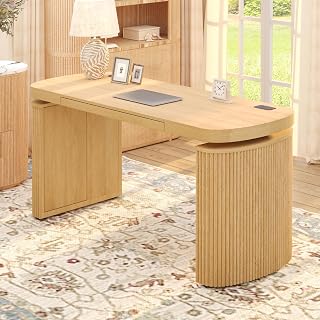
The fluted Japandi front is the rare case where the styling doesn’t cost you function, with hidden storage, integrated wireless charging, and a touchscreen controller in a compact 55-inch footprint. Two-step assembly and a natural finish make it the best fit for a home office that doubles as a living space.
71″ Executive Desk with Glass Cabinet and LED Light
This one leans into display: a glass-front cabinet, open shelving, and LED accent lighting built into the hutch, all on a 71-inch electric base. If you want storage that presents well rather than just holds files, it’s the most complete unit here.
Frequently Asked Questions
Does the file cabinet raise and lower with the desk?
On the L-shaped models listed here, yes: the cabinet is mounted to the frame and travels with the top. That’s why lift capacity matters more on these than on a bare desk, since the cabinet and its contents count against the rating.
How much clearance do I need behind the desk?
Leave at least four inches for the power cable and control box, plus whatever your monitor arms need to tilt. Pushing the desk flush to a wall is the most common cause of pinched cables and premature lift failure.
Can one person assemble these?
The pre-assembled models are manageable solo, but flipping a 70-inch L-shaped top upright is a two-person job. Build the frame upside down on the packing foam, then recruit help for the flip.
Are the built-in outlets worth it?
They are, provided you route the feed cable with slack for the full travel range. Test the lift through its complete cycle before securing any cable management.
Final Thoughts
For most corner offices, the 70″ L-shaped walnut desk with file cabinet gives you the best combination of surface area, integrated power, and storage in one purchase. If you’d rather skip the build, the 66.93″ model with its fully assembled cabinet and pre-installed frame is the fastest path to a working desk, while the FLEXISPOT 55 x 24 is the one to pick when the desk has to look good in a room that isn’t just an office.