Key takeaways
- Seat shape: Look for a wide, level cushion that supports your thighs without pressing sharply into the backs of your knees. A waterfall-style front edge can help reduce pressure.
- Seat height: Your feet should rest flat on the floor, with your knees roughly level with or slightly below your hips. If the chair is too tall, add a sturdy footrest rather than dangling your legs.
- Adjustability: Prioritize seat height, recline tension, armrests, and lumbar support you can actually position. Small adjustments often matter more than flashy feature counts.
- Support and stability: Check the stated weight rating, five-star base, casters, and frame construction. A chair that flexes or rolls unexpectedly makes it harder to maintain a relaxed posture.
- Movement: A slight recline and occasional position changes are usually more comfortable than locking yourself rigidly upright. Pair the chair with short standing and walking breaks.
What's inside
Hip pain can turn an ordinary workday into a constant cycle of shifting, standing, and trying to find one position that does not hurt. The trouble is that “ergonomic” labels do not guarantee a seat that suits your body: a cushion may be too firm, the chair pan may be too narrow, or the lumbar support may push your pelvis forward.
This guide takes a hands-on DIY maker approach to choosing a better setup for long desk sessions. I looked for practical features—usable seat depth, supportive foam, adjustable recline, stable bases, and weight capacity—while keeping in mind that a chair can reduce pressure, but it cannot diagnose or treat an underlying hip condition. The products below are selected for different body sizes, budgets, and workspace styles.
As an Amazon Associate we earn from qualifying purchases.


How to Choose an Office Chair For Hip Pain (2026)
- Seat shape: Look for a wide, level cushion that supports your thighs without pressing sharply into the backs of your knees. A waterfall-style front edge can help reduce pressure.
- Seat height: Your feet should rest flat on the floor, with your knees roughly level with or slightly below your hips. If the chair is too tall, add a sturdy footrest rather than dangling your legs.
- Adjustability: Prioritize seat height, recline tension, armrests, and lumbar support you can actually position. Small adjustments often matter more than flashy feature counts.
- Support and stability: Check the stated weight rating, five-star base, casters, and frame construction. A chair that flexes or rolls unexpectedly makes it harder to maintain a relaxed posture.
- Movement: A slight recline and occasional position changes are usually more comfortable than locking yourself rigidly upright. Pair the chair with short standing and walking breaks.
The Best Office Chair For Hip Pain (2026)s Reviewed
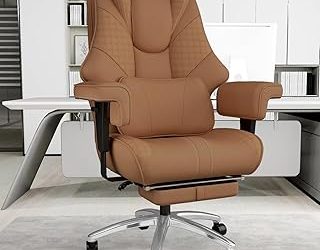
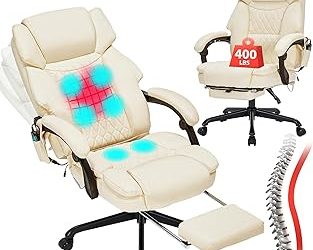
GTPLAYER Big and Tall Gaming Chair
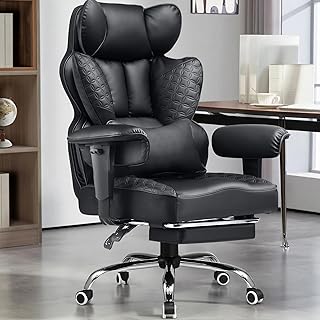
This heavy-duty GTPLAYER chair is a practical option for larger users who need a broad, substantial seat rather than a compact task-chair cushion. Its saddle-shaped cushion, pocket-spring construction, high back, adjustable lumbar support, and included footrest give you several ways to spread pressure during long sessions. The gaming styling is bold, but the important DIY takeaway is its combination of capacity and usable lower-body support.
Lexeme Memory Foam Seat Cushion
If your current chair is structurally sound but its seat feels like a board, the Lexeme cushion is the simplest upgrade to test first. The memory-foam design and coccyx cutout aim to reduce concentrated pressure beneath the pelvis, while the separate lumbar pillow can help tune your sitting position. Measure your chair pan before buying; an oversized cushion can reduce usable seat depth and leave your knees too close to the desk.
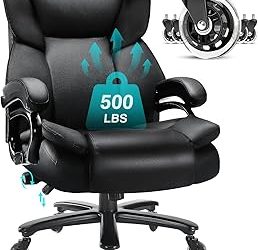
CIOMAN 500lbs Big and Tall Office Chair
CIOMAN focuses on roominess and a high weight rating, making it worth considering for users who find standard office chairs cramped. Its wide cushion, inflatable lumbar support, rocking function, and rubber wheels offer useful adjustability, especially if fixed lumbar pads never land in the right place. Inflate the lumbar section gradually and test it over several sessions rather than starting at maximum firmness.
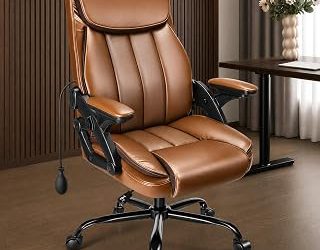
Ergonomic Office Chair with Virgin Foam Seat
This chair takes a more conventional ergonomic route, pairing a virgin-foam seat with a 2D lumbar system, 3D headrest, and tilt-and-rock mechanism. It may suit a home office where you want a softer, more polished look than a gaming chair. The white-and-gold finish will show dirt more readily, so keep a cloth nearby and verify the available seat dimensions before committing.
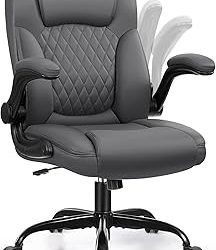
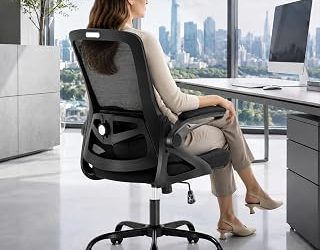
Ergonomic Mesh Office Chair, 400lbs
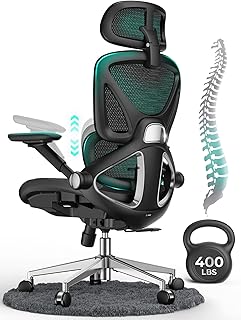
For warm rooms, this mesh chair is a compelling alternative to thick foam. The high back, adjustable lumbar support, 4D flip-up arms, three-level tilt, 3D headrest, and PU wheels provide a broad adjustment range without requiring a bulky cushion. Mesh can feel firmer than padded upholstery, so pair it with a thin seat pad only if the seat does not create pressure points or raise you too high for your desk.
Frequently Asked Questions
Is a firm or soft chair better for hip pain?
Neither is universally best. A supportive medium-firm cushion usually prevents sinking and pelvic twisting, while a removable memory-foam pad can add comfort when the original seat is too hard. The right choice is the one that distributes pressure without forcing your hips into an awkward angle.
How high should my office chair be?
Set the height so both feet are supported and your knees are close to a right angle. Your elbows should reach the desk without shrugging your shoulders. If the desk is fixed and too high, a footrest may be more practical than raising the chair until your feet lose contact with the floor.
Can an office chair fix hip pain?
A better chair may reduce discomfort caused by pressure, poor positioning, or prolonged static sitting, but it is not a medical treatment. Persistent, worsening, or radiating pain deserves evaluation by a qualified healthcare professional.
How often should I move while working?
Change position frequently instead of waiting for pain to appear. Stand, walk briefly, or perform gentle movement every 30 to 60 minutes, and adjust the chair when your posture starts to collapse.
Final Thoughts
For a roomy, heavy-duty setup, the GTPLAYER Big and Tall Gaming Chair is the strongest starting point; the CIOMAN is another good fit when broad dimensions and adjustable lumbar support matter most. If your existing chair is otherwise reliable, the Lexeme Memory Foam Seat Cushion is the most economical experiment before replacing the whole workstation.