Key takeaways
- Where the storage lives: Drawers mounted to the underside of the top rise with the desk and stay usable at any height. Storage built into a fixed pedestal or hutch does not travel, which means your files sit at knee level when you’re standing. Decide which arrangement matches how you actually work before you compare anything else.
- Weight budget, not weight capacity: Advertised lift ratings assume an empty desk. Subtract the top, the drawer unit, and whatever you plan to store, then check what’s left for monitors and gear. A 154 lb rating shrinks fast once a loaded three-drawer tower is hanging off the frame.
- Leg count and torsional stiffness: Two-leg frames flex diagonally under load, and storage adds load. Four-leg designs and L-shaped configurations resist that twist far better, which is why they’re the safer choice if you type hard or run a dual-monitor arm.
- Built-in power and cable routing: Integrated AC outlets and USB ports on the desktop are more than convenience — they cut the number of cables that have to travel down a moving leg. Look for a wire tray or spine; without one you’ll be zip-tying a harness yourself within a week.
- Assembly reality check: Storage desks ship heavy, often in two or three boxes, and pre-assembled drawer units cut build time dramatically. If you’re working solo, favor models with pre-drilled tops and quick-connect frames, and clear a couple of hours regardless of the box copy.
What's inside
Anyone who has built their own desk knows the compromise: you can have a rock-solid frame, or you can have drawers, but bolting cabinetry onto a moving column usually ends in wobble and rattling hardware. That’s why so many people cobble together a sit-stand base and then park a rolling file cabinet underneath, only to find it collides with the crossbar every time the desk drops to seated height. Storage and motion don’t naturally get along, and most manufacturers pick one and quietly ignore the other.
The good news is that a handful of 2026 models were engineered from the frame up to carry weight and hide clutter at the same time — integrated drawers, cable-managed power strips, shelving that travels with the top instead of fighting it. I’ve spent enough time with an Allen key and a stud finder to know which details matter and which are marketing. Below are six desks worth your bench time, plus a buying framework built around what actually fails first.
As an Amazon Associate we earn from qualifying purchases.




How to Choose a/an Standing Desk With Storage (2026)
- Where the storage lives: Drawers mounted to the underside of the top rise with the desk and stay usable at any height. Storage built into a fixed pedestal or hutch does not travel, which means your files sit at knee level when you’re standing. Decide which arrangement matches how you actually work before you compare anything else.
- Weight budget, not weight capacity: Advertised lift ratings assume an empty desk. Subtract the top, the drawer unit, and whatever you plan to store, then check what’s left for monitors and gear. A 154 lb rating shrinks fast once a loaded three-drawer tower is hanging off the frame.
- Leg count and torsional stiffness: Two-leg frames flex diagonally under load, and storage adds load. Four-leg designs and L-shaped configurations resist that twist far better, which is why they’re the safer choice if you type hard or run a dual-monitor arm.
- Built-in power and cable routing: Integrated AC outlets and USB ports on the desktop are more than convenience — they cut the number of cables that have to travel down a moving leg. Look for a wire tray or spine; without one you’ll be zip-tying a harness yourself within a week.
- Assembly reality check: Storage desks ship heavy, often in two or three boxes, and pre-assembled drawer units cut build time dramatically. If you’re working solo, favor models with pre-drilled tops and quick-connect frames, and clear a couple of hours regardless of the box copy.
The Best Standing Desk With Storage (2026)s Reviewed
SEDETA Farmhouse L Shaped Standing Desk, 63″ x 67″
The corner geometry does the structural heavy lifting here, giving you a genuinely stiff platform across two work zones without adding a third leg to trip over. Built-in power outlets and the executive-scale footprint make it the pick for anyone running a home office that doubles as a workshop desk.
FLEXISPOT Comhar 55″ Electric Standing Desk
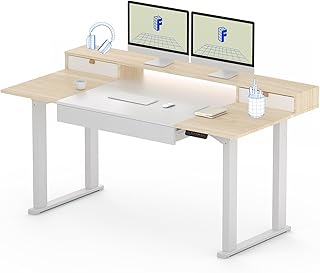
The Comhar is the cleanest execution of an all-in-one: a single-piece walnut top with the drawer, USB charging, and controller integrated so there’s almost nothing left to assemble or route. Child lock and a tidy underside make it the least fussy option on this list for smaller rooms.
70″ Executive Standing Desk with AC/USB and Privacy Panel
The one-piece 70-inch top is the standout — no seam down the middle means no sag between the legs, which matters when you’re leaning into the work. The privacy panel and onboard AC make it feel more like commissioned casework than flat-pack furniture.
FLEXISPOT 4-Leg Standing Desk, 63″ x 32″
Four legs plus three drawers and open shelving is the most storage-per-square-foot arrangement here, and the extra columns keep it steady even when the cabinet is fully loaded. If your current desk shudders when you type, this frame is the fix.
Mid Century Modern Electric Standing Desk, 55″ x 22″
At 22 inches deep, this is the desk for apartments, alcoves, and spare-bedroom corners where a standard 30-inch top simply won’t clear the door. The walnut finish and tapered detailing read as furniture rather than office equipment, which helps when the desk lives in a shared space.
Frequently Asked Questions
Do drawers make a standing desk wobble?
Only if the drawer unit is heavy and the frame is a two-leg design. Drawers mounted directly to the underside of the top add mass low and centered, which is generally fine; the wobble people report usually comes from tall columns at maximum height, not the storage itself.
Can I add my own storage to a desk I already own?
Yes, with two caveats. Confirm the top is solid enough to hold screws — many are particleboard with a thin veneer — and dry-fit the unit at the desk’s lowest setting to make sure it clears the crossbar and your chair arms.
How much clearance do the drawers need under the desk?
Plan on losing roughly four to six inches of legroom. Measure from your seated thigh to the underside of the top before you buy; if you’re taller than average, a side-mounted or L-shaped storage layout will be more comfortable than a center drawer.
Are built-in outlets worth paying extra for?
For a storage desk, yes. Integrated power means one cable running down the leg instead of five, which reduces the chance of a cord snagging during travel — the most common cause of desk motor and cable damage.
Final Thoughts
If you want maximum surface and structural rigidity, the SEDETA Farmhouse L-Shaped 63″ x 67″ is the strongest all-rounder, while the FLEXISPOT 4-Leg 63″ x 32″ wins on sheer storage capacity and stability under load. For tight rooms where the desk has to look like furniture, the Mid Century Modern 55″ x 22″ delivers the cleanest fit with the least compromise.