Key takeaways
- Motion type: Rocker boards tilt on one axis and are the easiest to work on. Wobble and 360-degree swivel decks move every direction — better for core engagement, worse for typing accuracy. If this is your first board, start with a rocker or a shallow wobble.
- Deck size: Measure your natural stance width, then add four inches. Anything narrower forces your feet together and turns the board into a balance drill instead of a desk accessory. Look for decks around 26 inches or wider if you’re over six feet tall.
- Tilt angle: Roughly 10 to 15 degrees is the sweet spot for all-day use. Steeper boards look impressive and get shoved under the credenza by week two.
- Surface and underside: A textured or cork top keeps socks from sliding; a rubberized base protects hardwood and stops the board from creeping across the floor. Check both — plenty of boards only get one right.
- Materials and load rating: Layered birch ply holds up better than particleboard with a veneer, and molded foam works well for cushioned models. Confirm the weight capacity clears your body weight plus a comfortable margin.
What's inside
Standing desks solve one problem and quietly create another. After the novelty wears off, most people discover that standing still on a hard floor for six hours is its own kind of misery — heels ache, calves tighten, and by mid-afternoon you’re leaning on one hip like a bored teenager. The fix isn’t more standing. It’s movement, the small unconscious kind that keeps blood moving and joints loose without stealing your attention from work.
That’s the job a balance board does. I’ve spent enough time under a desk with a tape measure and a level to know that not all of them do it well: some tip too aggressively to type on, others are so stiff they may as well be plywood. This guide covers what actually matters in a board — tilt range, deck footprint, surface grip, and build quality — and reviews the models worth your money in 2026.
As an Amazon Associate we earn from qualifying purchases.



How to Choose a Balance Board For Standing Desk (2026)
- Motion type: Rocker boards tilt on one axis and are the easiest to work on. Wobble and 360-degree swivel decks move every direction — better for core engagement, worse for typing accuracy. If this is your first board, start with a rocker or a shallow wobble.
- Deck size: Measure your natural stance width, then add four inches. Anything narrower forces your feet together and turns the board into a balance drill instead of a desk accessory. Look for decks around 26 inches or wider if you’re over six feet tall.
- Tilt angle: Roughly 10 to 15 degrees is the sweet spot for all-day use. Steeper boards look impressive and get shoved under the credenza by week two.
- Surface and underside: A textured or cork top keeps socks from sliding; a rubberized base protects hardwood and stops the board from creeping across the floor. Check both — plenty of boards only get one right.
- Materials and load rating: Layered birch ply holds up better than particleboard with a veneer, and molded foam works well for cushioned models. Confirm the weight capacity clears your body weight plus a comfortable margin.
The Best Balance Board For Standing Desk (2026)s Reviewed
Trobing Standing Desk Mat Balance Board with Rollerball
Trobing’s wooden deck pairs a gentle wobble with an integrated rollerball, so you can shift between subtle rocking and working a knot out of your arch without leaving your desk. The wood feels genuinely solid underfoot and the non-slip base stays put on both tile and low-pile carpet.
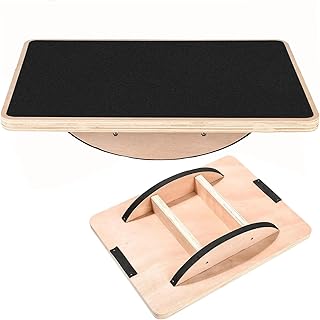
Standing Desk Anti-Fatigue Rocker Board (Large Size)
The large footprint is the whole point here — a wide deck lets you stand hip-width apart, which is the difference between a board you use and a board you trip over. The single-axis rocker motion is mild enough that you’ll forget you’re on it during a call.
Gaiam Evolve Balance Board
Gaiam’s Evolve is the most refined design of the group, with a curved deck that encourages constant micro-movement rather than deliberate balancing. It doubles convincingly as physical therapy and stability equipment, so it earns its keep outside work hours too.
2-In-1 Standing Desk Balance Board & Foot Mat
Flip it one way for 360-degree swivel wobble, flip it the other for a cushioned massage surface — a smart answer to the fact that nobody wants active balance all day long. The dual-sided build is the most versatile option here if you like alternating throughout your shift.
Yes4All Wobble Balance Board with Massage Ball
Yes4All bundles a wobble deck with an anti-fatigue foam pad, which covers both halves of the standing-desk problem in one purchase. The included massage ball is a small thing that gets used more than you’d expect.
Frequently Asked Questions
Will a balance board actually reduce foot and back pain?
Indirectly, yes. The relief comes from constant weight redistribution and calf activation rather than cushioning, which keeps circulation up and prevents any single tissue from bearing load too long. It won’t fix pain caused by poor desk height or monitor position, so sort your ergonomics out first.
How long should I stand on one each day?
Build up gradually — 20 to 30 minutes at a stretch to start, alternating with sitting and flat standing. Your calves and ankles need a week or two to adapt before longer sessions feel natural.
Can I use one on carpet?
Rocker and wobble boards work fine on low-pile carpet, though the motion feels slightly damped. Thick or plush carpet absorbs too much tilt; set the board on a hard mat or a scrap of plywood to restore the range.
Are they safe on hardwood floors?
Check that the contact points are rubber or covered in felt. If yours aren’t, self-adhesive felt pads from any hardware store solve it in two minutes and also quiet the board considerably.
Final Thoughts
For most people, the Gaiam Evolve hits the best balance of gentle motion and everyday usability, while the large-size rocker board is the pick if you want a wide, stable deck you can stand on for hours. If you’d rather have options, the 2-in-1 balance board and foot mat lets you switch between active wobble and cushioned recovery on the same piece of gear.