Key takeaways
- Depth over width: Width gets the attention, but depth determines whether you can sit far enough back. Two 27″ panels need 28″ of depth minimum; a 49″ ultrawide wants 30″–32″ or you will be scanning side to side with your neck instead of your eyes.
- Clamp zone thickness: Monitor arms need a solid, uniform edge, typically 0.6″–1.5″ thick with no lip or bullnose. Check that the rear edge is not hollow-core, and back the clamp with a scrap hardwood plate to spread the load.
- Rated capacity, then subtract: A 154–176 lb rating covers screens, arms, a PC tower, and a printer. Treat published numbers as static load and leave a third in reserve, especially on a lifting column that has to move that mass.
- Frame geometry: Look for welded steel, dual crossbars, and adjustable feet. Lateral sway is the enemy of a tall triple-monitor stack, and a single-beam frame will telegraph every keystroke.
- Power and routing planned in: Built-in outlets and USB ports beat a daisy chain of extension cords. Confirm there is a grommet or a rear channel; if not, a 2″ hole saw and a snap-in grommet takes ten minutes.
What's inside
Anyone who has tried to bolt a dual-monitor arm onto a cheap desk knows the moment: you tighten the C-clamp, the desktop flexes, and a hairline crack spiders out through the laminate. Multi-monitor setups punish furniture in ways single-screen work never does. You are asking one surface to carry 40+ pounds of cantilevered glass and aluminum, absorb keyboard vibration without wobbling the panels, and still leave room for your forearms. Most desks sold as “gaming” or “executive” simply were not engineered for that leverage.
This guide comes from a workbench perspective: what the frame is actually made of, how thick the desktop is where the clamp bites, whether the crossbar leaves clearance for a mount, and how much depth you need before an ultrawide stops giving you a headache. Below are six desks that hold up under real dual- and triple-screen loads, plus the specs worth checking before you commit.
As an Amazon Associate we earn from qualifying purchases.


How to Choose a/an Home Office Desk For Multiple Monitors (2026)
- Depth over width: Width gets the attention, but depth determines whether you can sit far enough back. Two 27″ panels need 28″ of depth minimum; a 49″ ultrawide wants 30″–32″ or you will be scanning side to side with your neck instead of your eyes.
- Clamp zone thickness: Monitor arms need a solid, uniform edge, typically 0.6″–1.5″ thick with no lip or bullnose. Check that the rear edge is not hollow-core, and back the clamp with a scrap hardwood plate to spread the load.
- Rated capacity, then subtract: A 154–176 lb rating covers screens, arms, a PC tower, and a printer. Treat published numbers as static load and leave a third in reserve, especially on a lifting column that has to move that mass.
- Frame geometry: Look for welded steel, dual crossbars, and adjustable feet. Lateral sway is the enemy of a tall triple-monitor stack, and a single-beam frame will telegraph every keystroke.
- Power and routing planned in: Built-in outlets and USB ports beat a daisy chain of extension cords. Confirm there is a grommet or a rear channel; if not, a 2″ hole saw and a snap-in grommet takes ten minutes.
The Best Home Office Desk For Multiple Monitors (2026)s Reviewed
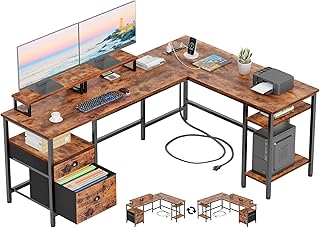
Furologee 66″ L-Shaped Desk with Power Outlet
The reversible corner layout gives you a genuine second plane for a laptop or audio interface, and the built-in outlet strip removes the usual under-desk spaghetti. The two included monitor risers are handy for basic elevation, though I would still run arms off the long return where the top is best supported.
55″ U-Shaped Electric Standing Desk
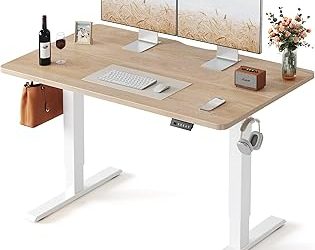
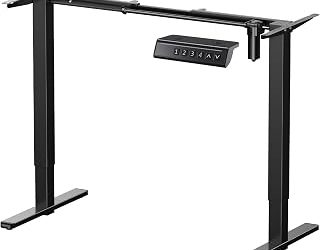
A U-shaped foot design is the right call for a sit-stand build carrying screens, since it kills the front-to-back rocking that plagues T-leg frames at full extension. Three presets, a 28.3″–46.5″ range, and a keyboard tray make it the most ergonomically complete pick here; the LED lighting is a bonus, not the reason to buy.
Grandder 55×32 Extra-Deep Electric Standing Desk
That 32″ depth is the headline, and it is the single spec that matters most if you run a 49″ ultrawide alongside a vertical secondary panel. Anti-collision sensing plus 176 lb capacity means you can load it heavily without worrying about a column stalling against a windowsill.
LVB 70.8″ Industrial Computer Desk
Straightforward wood-and-steel construction with almost six feet of uninterrupted top, which is exactly what you want for a triple-monitor spread or a two-person shared workstation. There is no built-in cable management, so budget an afternoon for a raceway and a couple of grommets.
Korfile 59″ L-Shaped Desk with Power Outlets
Four adjustable drawers and a reversible corner make this the most storage-dense option without pushing into cabinet-desk territory. The black finish hides cable runs well, and integrated outlets keep the power brick clutter contained behind the panel.
Frequently Asked Questions
Can I mount monitor arms to a laminate particleboard desk?
Usually yes, if the top is at least 0.75″ thick and solid at the clamp point. Add a small hardwood or steel backing plate between the clamp jaw and the underside to distribute pressure and prevent the surface from denting or delaminating.
How much desk depth do I need for three monitors?
Plan for 30″ minimum. Three angled panels form an arc, so the center screen sits farther back than the wings, and shallow desks force you to push the outer displays past a comfortable viewing angle.
Are standing desks stable enough for heavy multi-screen setups?
Modern dual-motor frames are, provided you respect the load rating and keep the heaviest mass centered. U-shaped or wide-stance feet resist sway noticeably better than narrow T-legs at standing height.
Is an L-shaped desk better than a long rectangular one?
L-shapes win on footprint efficiency and give you a dedicated secondary zone; long rectangles win on unbroken mounting surface. If you use a single crossbar arm for three screens, go rectangular.
Final Thoughts
For most multi-monitor builds, the Grandder 55×32 is the smartest buy because depth solves problems no amount of width can fix. If you want sit-stand ergonomics with genuine stability under load, the 55″ U-Shaped Electric Standing Desk is the pick, and the LVB 70.8″ remains the best value for anyone spreading three panels across a wide, no-nonsense wood top.