Key takeaways
- Lumbar travel, not just lumbar presence: A support pad that slides up and down the backrest lets you place the curve at your L3 to L5 region. Fixed foam bulges only work if your torso happens to match the factory average.
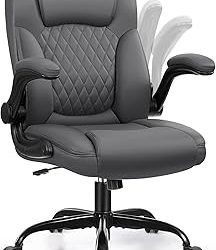
- Armrest degrees of freedom: 2D armrests move up and in. 3D adds forward or pivot travel, which matters if you switch between typing and sketching. Flip-up arms are handy when you want to tuck the chair under a narrow desk.
- Recline range and lock points: Look for a stated arc, something like 90 to 120 degrees, plus a tilt lock. A chair that only free-rocks gets tiring because your core keeps stabilizing it.
- Seat pan depth and edge shape: A waterfall front edge reduces pressure behind the knees. If the pan is too deep for your leg length, no amount of lumbar adjustment will fix the resulting slouch.
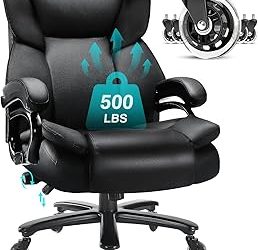
- Base and cylinder rating: Nylon bases are fine for lighter loads, but a stated weight capacity near 300 pounds usually signals a thicker gas lift and heavier gauge frame. Check caster diameter too, since larger wheels roll better on rugs.
What's inside
Anyone who has spent a Saturday afternoon assembling flat-pack furniture knows the feeling: you tighten the last bolt, sit down, and within twenty minutes your lower back is quietly filing a complaint. The problem is rarely the assembly. It is that most desk chairs treat lumbar support as a molded bump in the backrest rather than an adjustable component that meets your spine where it actually curves. Sit in one for eight hours and you end up perched forward on the seat edge, doing the postural work the chair was supposed to handle.
This guide takes a builder’s view of the problem. We looked at what is actually adjustable, how the mesh is tensioned, whether the lumbar pad travels vertically or just in and out, and how each frame holds up once the novelty wears off. Below are six chairs worth considering in 2026, along with the specs that matter when you are comparing them side by side.
As an Amazon Associate we earn from qualifying purchases.


🛒 Best Price Today on Amazon
Prime members get fast, free shipping on everything above, plus member-only deals. New members get a 30-day free trial — cancel anytime.
How to Choose a/an Ergonomic Office Chair With Lumbar Support (2026)
- Lumbar travel, not just lumbar presence: A support pad that slides up and down the backrest lets you place the curve at your L3 to L5 region. Fixed foam bulges only work if your torso happens to match the factory average.
- Armrest degrees of freedom: 2D armrests move up and in. 3D adds forward or pivot travel, which matters if you switch between typing and sketching. Flip-up arms are handy when you want to tuck the chair under a narrow desk.
- Recline range and lock points: Look for a stated arc, something like 90 to 120 degrees, plus a tilt lock. A chair that only free-rocks gets tiring because your core keeps stabilizing it.
- Seat pan depth and edge shape: A waterfall front edge reduces pressure behind the knees. If the pan is too deep for your leg length, no amount of lumbar adjustment will fix the resulting slouch.
- Base and cylinder rating: Nylon bases are fine for lighter loads, but a stated weight capacity near 300 pounds usually signals a thicker gas lift and heavier gauge frame. Check caster diameter too, since larger wheels roll better on rugs.
The Best Ergonomic Office Chair With Lumbar Support (2026)s Reviewed
Fizzin Mesh Office Chair
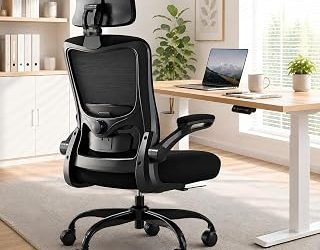
The Fizzin pairs an adjustable lumbar mechanism with a thickened cushion, which is an unusual combination in this price bracket where you normally choose between breathable mesh and real seat padding. The headrest tilts independently, making it a reasonable pick for anyone who leans back to read or take calls.
Marsail Ergonomic Office Chair
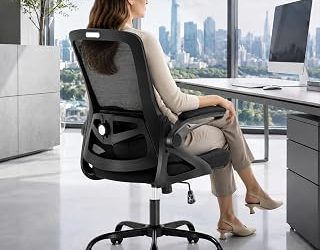
Marsail’s 2D headrest and contoured seat cushion do the heavy lifting here, and the adjustable armrests are firm enough that they do not sag under forearm weight over time. The recline is smooth rather than springy, which suits long stretches of focused desk work better than a bouncy tilt.
Mesh Executive Task Chair with 3D Armrests
This one leans wider than most, with a generous seat pan and 3D armrests that give you genuine forward and lateral positioning. It reads as an executive chair but the adjustable lumbar and tilt function put it firmly in the ergonomic category rather than the merely large one.
marrap Ergonomic Office Chair
The 90 to 120 degree rocking range is the standout feature, giving you a real recline arc instead of a token few degrees. Combined with 3D armrests and a headrest, it makes a solid all-mesh option for a home office that doubles as a reading corner.
HON Ignition 2.0
HON builds for commercial contract environments, and the Ignition 2.0 shows it in the frame rigidity and the quality of the gas cylinder. It is the most conservative-looking chair here, but if you want something that will still feel tight after five years of daily use, this is the one to beat.
Frequently Asked Questions
How high should the lumbar support sit?
Aim for the natural inward curve just above your beltline, roughly at the level of your navel when measured around. Sit fully back, then adjust the pad until it fills the gap without pushing you forward.
Is mesh or a padded seat better?
Mesh backs win on airflow and are worth having in warm rooms. For the seat itself, molded foam usually holds up better over long sessions than stretched mesh, which is why several chairs here combine the two.
Do I need a headrest?
Only if you actually recline. If you sit upright at a keyboard most of the day, a headrest sits behind your head doing nothing. If you lean back on calls, it takes real load off your neck.
How long does assembly take?
Most of these go together in 20 to 40 minutes with the included hex key. Attach the backrest to the seat before installing the gas lift, and leave every bolt a half turn loose until the frame is fully aligned.
Final Thoughts
If you want the longest service life and do not mind a plainer look, the HON Ignition 2.0 is the safest bet in this group thanks to its contract-grade frame. For a better balance of adjustability and value, the Marsail is the one we would put in most home offices, while the marrap earns a look if that wide 90 to 120 degree recline matches how you actually work.