Key takeaways
- Match the width range to your top, not your room: Frames adjust within a fixed span — a 43″–59″ frame won’t safely carry a 72″ slab without unsupported overhang. Measure your existing top first, then shop the range. Aim to have the feet land roughly 6–10 inches inside each end.
- Motor count changes feel, not just speed: Single brushless setups are quieter and cheaper; dual and triple motor frames lift more evenly under uneven loads like a monitor arm clamped to one side. If your gear is lopsided, spend up.
- Check capacity against everything, including the top: A 1.5″ solid maple slab can eat 60–70 lbs of a rated load before you’ve placed a single monitor. Subtract your desktop weight from the spec sheet number, then plan around what’s left.
- Height range beats height maximum: Low-end travel matters more than most listings suggest. If you’re under 5’6″, a frame that bottoms out at 28.3″ seated is far more usable than one that stops at 30″ but climbs higher.
- Look for anti-collision and stated presets: Anti-collision reverses the lift when it hits a shelf or drawer — worth it if your desk lives in a tight nook. Four presets is the practical sweet spot for a shared or multi-task setup.
What's inside
Buying a frame instead of a complete desk is the smartest move most people overlook. You’ve probably got a slab of butcher block in the garage, a door you salvaged, or a laminate top you already like — and paying twice for a surface you’ll immediately replace makes no sense. The catch is that frame specs are written for spreadsheet readers, not people holding a drill. Two legs or three? Brushless or dual motor? Does the crossbar actually reach your 63-inch top, or will you be shimming brackets at midnight?
This guide breaks down six frames worth bolting a top to in 2026, judged on the things that matter once you’re on the floor with an Allen key: real travel range, how the mounting rails handle non-standard thicknesses, wobble at full extension, and whether the controller remembers your presets after a power blip. Every pick here ships frame-only, so you keep control of the surface.
As an Amazon Associate we earn from qualifying purchases.


How to Choose a/an Standing Desk Frame (2026)
- Match the width range to your top, not your room: Frames adjust within a fixed span — a 43″–59″ frame won’t safely carry a 72″ slab without unsupported overhang. Measure your existing top first, then shop the range. Aim to have the feet land roughly 6–10 inches inside each end.
- Motor count changes feel, not just speed: Single brushless setups are quieter and cheaper; dual and triple motor frames lift more evenly under uneven loads like a monitor arm clamped to one side. If your gear is lopsided, spend up.
- Check capacity against everything, including the top: A 1.5″ solid maple slab can eat 60–70 lbs of a rated load before you’ve placed a single monitor. Subtract your desktop weight from the spec sheet number, then plan around what’s left.
- Height range beats height maximum: Low-end travel matters more than most listings suggest. If you’re under 5’6″, a frame that bottoms out at 28.3″ seated is far more usable than one that stops at 30″ but climbs higher.
- Look for anti-collision and stated presets: Anti-collision reverses the lift when it hits a shelf or drawer — worth it if your desk lives in a tight nook. Four presets is the practical sweet spot for a shared or multi-task setup.
The Best Standing Desk Frame (2026)s Reviewed
HUANUO Brushless Motor Frame
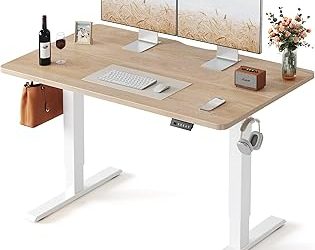
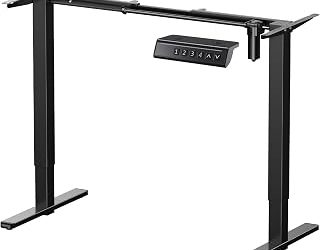
The quiet lift here is genuinely quiet, and the integrated cable tray plus dual hooks save you a separate wire-management build. Sized for tops up to 75 x 35 inches with 220 lbs of capacity and a wide 28.3″–46.5″ range, it’s the pick if you want the frame to disappear under your slab and stay out of the way.
TOPSKY Dual Motor Frame
Dual motors and 225 lbs of capacity make this the steadier choice for heavy monitor arms or a loaded top, and the 27.6″ low end is unusually generous for shorter users. The 43″–59″ width span covers most standard and custom tops without improvisation.
VIVO DESK-V100EBY
VIVO’s brushless single-motor workstation is the reliability play — simple mechanics, a memory controller that holds presets, and 220 lbs of headroom. Assembly is refreshingly straightforward, which matters when you’re drilling pilot holes into a top you can’t undo.
HUANUO Dual Motor 265 lb Frame
The T-shaped legs are the story: they clear space underneath and accept desktops up to 90 x 31.5 inches, so oversized slabs finally have a home. With 265 lbs of capacity and dual motors, this handles thick hardwood and a full monitor rig without complaint.
ErGear Electric Standing Desk Legs
Built explicitly for DIY builds, ErGear’s legs fit 39.4″–63.3″ tops, run at a measured 55 dB, and include four memory settings plus anti-collision. The 176 lb capacity is the tradeoff — fine for laminate or thin plywood, tight if you’re mounting a heavy butcher block.
Frequently Asked Questions
Can I use any desktop with these frames?
Almost. Confirm your top falls inside the frame’s stated width range and is at least 3/4″ thick so screws bite properly. For particleboard, use shorter screws and check depth before driving.
Do I need a three-leg frame for an L-shaped desk?
Yes. Corner tops need center support, which is why the VIVO DESK-V130EB uses a triple motor, 300 lb three-leg design. Two legs under an L-shape will sag at the corner.
How much wobble is normal at standing height?
A small amount of sway at full extension is expected on any two-leg frame. Wobble that continues after typing usually means loose leg bolts or a top that isn’t fully seated against the rails — recheck torque before blaming the frame.
Are presets lost during a power outage?
Most modern controllers store presets in non-volatile memory, so they survive unplugging. You may need to re-run the initial reset cycle after a long disconnection.
Final Thoughts
For most builds, the HUANUO Brushless frame delivers the best balance of quiet operation, capacity, and built-in cable management. Go with the TOPSKY dual motor frame if stability under uneven loads is your priority, or the HUANUO 265 lb T-leg frame when your slab is oversized and heavy.