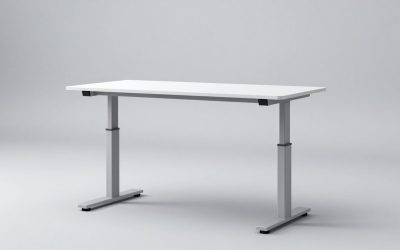
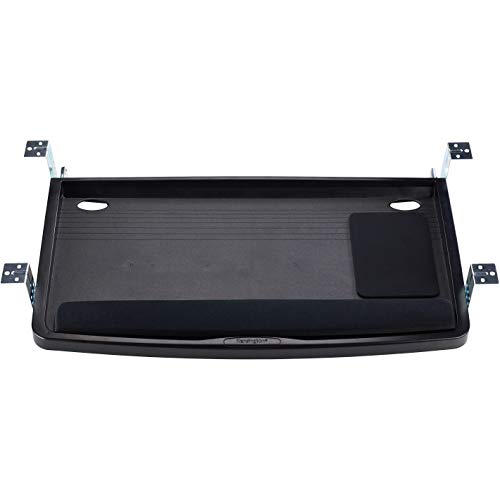
The VIVO MOUNT-KB05E clamp-on tray is the best overall pick for reclaiming legroom, with the BONTEC Under Desk Keyboard Tray as the runner-up for anyone who wants the same result for less.
Here’s the problem: you bought a beautiful solid-wood or L-shaped desk, and now your keyboard eats half the surface while your knees fight the modesty panel. Drilling into a desktop you spent real money on feels like vandalism, and most trays either sag under a mechanical board or refuse to clamp onto a thick top. This guide covers six trays I’ve mounted, loaded, and stress-tested on everything from a 1.5″ butcher-block slab to a hollow-core IKEA top — what actually holds, what rattles, and how to install without wrecking your desk.
Our top picks


As an Amazon Associate we earn from qualifying purchases at no extra cost to you.
Quick Comparison
| Product | Best For | Standout Feature | Rating |
|---|---|---|---|
| VIVO MOUNT-KB05E (27″ x 11″) | Most desks, no drilling | Wide platform on a clamp-only mount | Highly rated |
| BONTEC Pull-Out Keyboard & Mouse Platform | Budget builds and rentals | Smooth full-extension slides | Highly rated |
| XINLEI DSF4 Large C-Clamp Tray (25.6″) | Heavy mechanical setups | Beefy C-clamps, 30″ total span | Top rated |
| VIVO MOUNT-KB03B (25″ x 10″) | Compact and corner desks | Slim footprint, screw-mount stability | Highly rated |
| HUANUO 360° Adjustable Mouse Platform | Left-handed and mixed-grip users | Swiveling mouse pad | Highly rated |
How to Choose an Under-Desk Keyboard Tray for More Legroom
- Clamp vs. screw mount: Clamps need a flat, overhang-free edge and a desktop within the stated thickness range (usually 0.4″–1.6″). Screw mounts hold more weight but demand a solid top — never sink screws into a hollow-core panel without adding a plywood backer.
- Measure your knee zone first: Sit down, mark where your thighs actually land, then measure from the underside of the desk to that line. A tray hung too low steals the legroom you’re trying to create.
- Platform width vs. rail width: A 27″ tray needs roughly 27″ of unobstructed underside. Check for cross-braces, cable trays, and standing-desk motor housings before you buy.
- Weight and slide quality: Full-metal ball-bearing slides handle an 85-key aluminum board without droop. Nylon rollers get squeaky under load.
- Tilt and retraction: Negative tilt keeps wrists neutral; full retraction lets you push the tray away and use the desktop for sketching, soldering, or paperwork.
The Best Under-Desk Keyboard Trays and Drawers for More Legroom, Reviewed
Best Overall: VIVO Clamp-on 27″ x 11″ Keyboard Tray (MOUNT-KB05E)
The widest no-drill option I’ve installed — the twin clamps bit into a 1.25″ maple top in about four minutes with nothing but the included hex key. Best for renters, warranty-conscious desk owners, and anyone running a full-size board plus mouse on one surface.
Best Budget: BONTEC Under Desk Keyboard Tray
Full-extension slides and a serviceable tilt range for a fraction of the price of premium arms, though the plastic tilt knobs need re-snugging after a month of use. Ideal for a first ergonomic upgrade or a second workstation in the garage or workshop.
Best Premium: XINLEI Large C-Clamp Slide-Out Tray (DSF4)
The C-clamps here are noticeably thicker than the competition and spread load across 30″ of desk edge, which is why this one didn’t flex under a 3-pound brass-weighted keyboard. Pick it if you type on heavy custom boards or want the sturdiest clamp-on drawer available.
Best for Compact and Corner Desks: VIVO Under Desk 25″ x 10″ Tray (MOUNT-KB03B)
The shorter rails clear the inside corner brackets on most L-shaped desks where a 27″ tray simply won’t fit. Best for small home offices and anyone mounting into a solid top with screws for maximum rigidity.
Best for Left-Handed and Dual-Grip Users: HUANUO 360° Adjustable Mouse Platform
The rotating mouse pad swings to either side and tucks under the keyboard when you don’t need it — genuinely useful if you switch hands to fight RSI. Best for mixed-input users and CAD or editing work with a trackball.
Frequently Asked Questions
Will a clamp-on tray damage my desk?
Not if the pads are intact. Use the included rubber shims, and add a scrap of leather or thin cork for lacquered or veneered tops. Snug the clamps firmly, then stop — overtightening is what leaves dents.
Can I use these on a standing desk?
Yes, and it’s my preferred setup, because the tray travels with the top and keeps your wrist angle consistent at both heights. Confirm the rails clear the frame’s crossbar and lift columns before mounting.
What if my desktop is too thick to clamp?
Switch to a screw-mount model like the MOUNT-KB03B, or fabricate a spacer: glue and screw a hardwood cleat under the front edge to give the clamp jaws a thinner lip to grab.
How much legroom do I actually gain?
Moving a keyboard and mouse off the desktop typically buys back 10–12 inches of usable surface and lets you pull the chair 2–3 inches closer, which is what fixes the hunched-forward reach most people don’t notice until it’s gone.
Final Thoughts
For most home offices, the VIVO MOUNT-KB05E is the safest buy — wide, clamp-mounted, and reversible. Go with the XINLEI DSF4 if you’re loading it up with a heavy mechanical board, or the BONTEC tray if you want the ergonomic win without the spend. Measure your knee clearance and underside obstructions before ordering, and the install is a ten-minute job.